1 min read
What is a Facilitator Guide?
The success of instructor-led training (ILT) hinges on the quality of its delivery. You can have well-designed content, strong learning objectives,...
4 min read
Pat Michaels
:
Updated on July 28, 2026
One of the biggest advantages of LeaderGuide Pro is how quickly it can transform your training content into a professional Facilitator Guide or Participant Guide. But the users who get the most value from the software have one thing in common:
They do a little planning before they start a new guidebook.

Yes, you can click to start a new guidebook and begin building immediately. But spending a few minutes thinking through your structure, source materials, and setup options can save hours of rework later.
Here are seven best practices that experienced LeaderGuide Pro users follow when starting a new project.
Every software application has its own terminology, and LeaderGuide Pro is no different.
Before starting your first guidebook, become familiar with terms such as:
Understanding these concepts makes it easier to choose the right setup options and take advantage of the automation built into the software.
Many new users try to learn everything while building a guidebook. You'll have a much smoother experience if you spend a little time understanding how the guidebook structure works before diving into development.
Not every training program requires the same type of guidebook.
Before settling on one approach, create a few sample guidebooks using different layout options and Collections. This allows you to see:
A few minutes of experimentation can help you avoid rebuilding or restructuring a guidebook midway through a project.
Think of it as a test drive before committing to a design.
There are ten possible layout options for guidebooks in LeaderGuide Pro. Here are the four most popular
Best for flexibility and easy participant guide creation
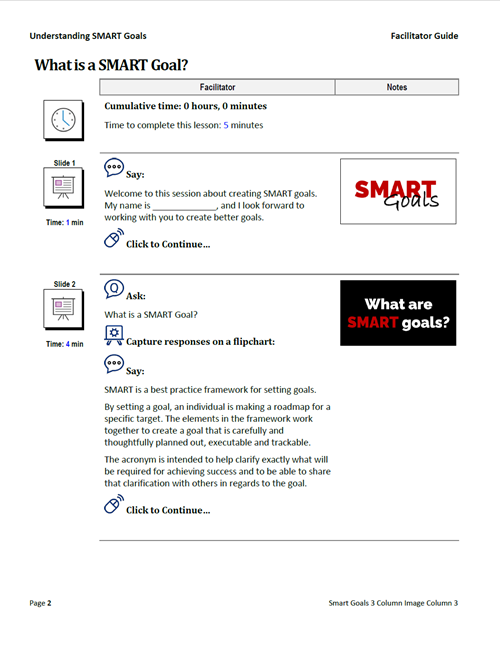
This 3-column layout gives you the most flexibility in LeaderGuide Pro. Place slide images in Column 2, add speaker notes in a content block below, and keep the guide easy to scan for facilitators.
Works well when you need a balanced mix of visuals and instruction.
Makes it easier to extract a participant guide from the facilitator guide.
Best for flexibility and easy participant guide creation
This 3-column layout gives you the most flexibility in LeaderGuide Pro. Place slide images in Column 2, add speaker notes in a content block below, and keep the guide easy to scan for facilitators.
Works well when you need a balanced mix of visuals and instruction.
Makes it easier to extract a participant guide from the facilitator guide.
Keeps slide content and speaker support organized in a clean, reusable structure.
Best for a simple, linear guidebook
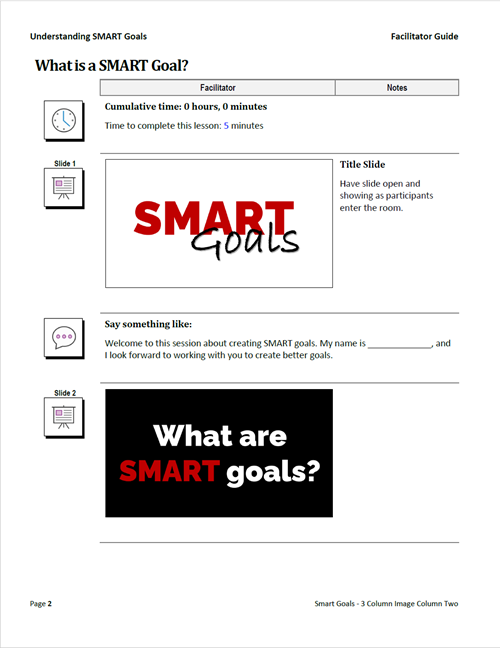
This 2-column layout is a strong default choice when you want a clean, straightforward facilitator or participant guide. Slide images appear in Column 2, with notes or supporting content placed beneath, creating a clear step-by-step flow for learners.
Provides a familiar, easy-to-follow structure.
Works well for participant guides that mirror the training sequence.
Keeps visuals and supporting notes organized without adding complexity.
Best for virtual instructor-led training
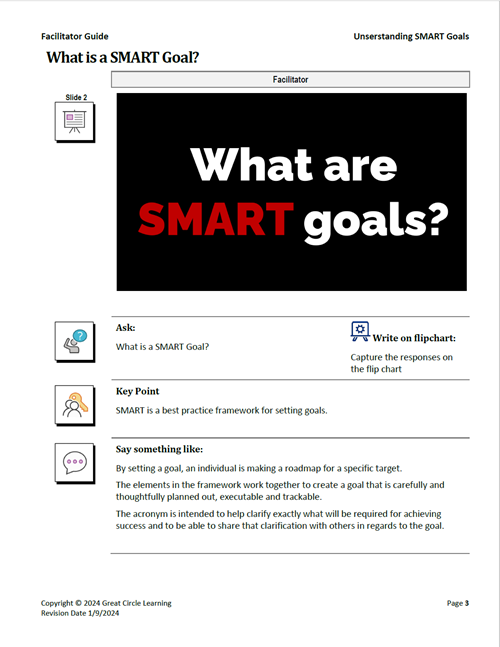
This layout works well for virtual ILT because it keeps the slide image visible in Column 1 while reserving Column 2 for facilitator instructions. If you need space for producer notes, you can add a third column or use the Merge/Split function on the LeaderGuide Pro ribbon.
Keeps slide context visible while facilitators deliver the session.
Creates a clear space for facilitator prompts and instructions.
Supports producer notes when your virtual session needs additional coordination.
This is probably the single biggest productivity tip for new users.
LeaderGuide Pro allows you to enter module names and lesson names during the Start a New Guidebook process. If you already have your course outline prepared, you can use this feature to create the framework of your guidebook in minutes.
Before starting, identify:
You'll immediately have a structured guidebook ready for content development rather than staring at a collection of blank pages.
An organized outline also makes it easier to divide work among multiple instructional designers or reviewers.
Many training teams build similar programs over and over again.
Leadership courses. Sales onboarding. Compliance training. Product training.
Rather than recreating the same framework each time, consider using the Guidebook Design Template wizard to capture your structure.
When you save a template that includes your standard modules and lessons:
This is one of the most underutilized productivity features in LeaderGuide Pro.
If your development process starts in PowerPoint, preparation pays off.
Before using the PowerPoint import features:
It's also important to decide which information you want LeaderGuide Pro to import:
A clean PowerPoint file leads to a cleaner guidebook build and reduces the amount of editing required afterward.
One of the easiest ways to personalize LeaderGuide Pro is by setting your preferences up front.
A few minutes invested here can save time on every guidebook you create.
Consider configuring:
Many users discover these settings after creating several guidebooks and then wish they had done it from the beginning.
Setting preferences early helps ensure consistency across all future projects.
The styles that LeaderGuide Pro uses are much more than formatting.
They support many of the automation features that make LeaderGuide Pro work.
New users occasionally treat the styles like ordinary Word styles and make extensive modifications without understanding the impact. While customization is encouraged, it's important to understand which styles support guidebook functionality and how changes should be made.
A basic understanding of LGP Styles will help you:
The most successful LeaderGuide Pro users work with the styles rather than around them.
LeaderGuide Pro was designed to automate many of the repetitive tasks involved in guidebook development, but automation works best when you start with a solid foundation.
Before building your next guidebook:
A little preparation upfront can dramatically reduce development time and help you take full advantage of everything LeaderGuide Pro has to offer.
1 min read
The success of instructor-led training (ILT) hinges on the quality of its delivery. You can have well-designed content, strong learning objectives,...
1 min read
Instructor-led training isn’t going anywhere. But the expectations around how it’s designed and delivered have changed.
1 min read
A well-designed facilitator guide does more than organize content. It supports instructors before the session begins and enables them to deliver a...