6 min read

AIM, Then CLEAR: Write Better Facilitator Instructions

AIM, Then CLEAR: Write Better Facilitator Instructions
10:23

Writing facilitator instructions sounds simple until you actually have to do it. Give the facilitator too little information, and they are forced to interpret, improvise, or guess. Give them too much information, and the facilitator guide becomes difficult to scan and use while standing in front of a class.

The goal is not simply to write more or less. The goal is to give the facilitator:

  • exactly what they need
  • when they need it
  • in a format they can use at a glance

That is where AIM & CLEAR can help.

AIM & CLEAR is a two-step methodology for developing facilitator instructions:

AIM makes the instructions complete. CLEAR makes them concise and usable.

The order matters.

First, make sure the facilitator has everything they need to successfully perform the instructional action. Then edit that information so they can quickly understand and use it during delivery.

Facilitator Instructions Are Part of a Larger System

Facilitator instructions don't exist in isolation. They are one part of a larger instructional system.

The ILT Triumvirate looks at the relationship between three resources that support instructor-led training:

  • Facilitator Guide
  • Participant Guide
  • Slide Deck

Each has a different job, but all three need to work together to support the same instructional experience.

When facilitator instructions are unclear, incomplete, or difficult to use, that weakness can affect the delivery of the training and the alignment between those resources.

The AIM & CLEAR methodology focuses on one specific part of that larger system: creating facilitator instructions that support consistent delivery.

The Challenge: Complete vs. Concise

When writing facilitator guides, there is a natural tension between completeness and conciseness.

Instructions need to be complete enough that another facilitator can deliver the training without having to ask the course designer what was intended.

But they also need to be concise enough that the facilitator can find and process the information while actively teaching.

Think about the difference between these two instructions:

Too little:

Discuss good communication.

What should the facilitator discuss? What should they ask? How many responses should they take? What points should emerge from the discussion? Where is the discussion supposed to lead?

Now consider the other extreme:

Ask participants to think about their experiences communicating with coworkers and identify characteristics they believe contribute to effective workplace communication. Allow participants time to think about the question and then ask volunteers to provide examples. As participants respond, acknowledge their contributions and look for opportunities to highlight several important communication characteristics...

There may be useful information in there, but the facilitator has to dig through a paragraph to find it.

The solution is not choosing between detailed and brief.

It is using a process that gets you to complete and concise.

Step 1: AIM for Completeness

The AIM acronym helps you develop the first draft of the facilitator instructions.

What specifically needs to happen?

Identify what the facilitator must actually do.

For example:

  • Ask a question

  • Explain a concept

  • Invite responses

  • Record participant ideas

  • Demonstrate a process

  • Direct an activity

  • Debrief an exercise

  • Show an example

Don't worry about making the instruction elegant yet. The first goal is to identify the actions required for successful delivery.

What does the facilitator need to know or communicate?

Now identify the information necessary to carry out those actions correctly.

Depending on the instructional moment, that could include:

  • Key talking points

  • Questions

  • Expected responses

  • Examples

  • Definitions

  • Activity directions

  • Timing

  • Materials

  • Debrief questions

  • Slide & page references

A useful test is:

If I leave this out, could the facilitator miss something important or perform the action incorrectly?

If the answer is yes, it belongs in the draft.

What needs to happen before the facilitator moves forward?

Good facilitator instructions don't leave the facilitator wondering, Okay, now what?

The facilitator may need to:

  • Summarize the discussion

  • Introduce an important response participants missed

  • Reinforce a key takeaway

  • Transition to the next topic

  • Advance the slide

  • Direct participants to the next activity

The Move On step gives the Content Block a clear conclusion and maintains instructional flow.

The first AIM draft may be longer than you ultimately want.

That's okay.

At this point, you're solving for completeness.

Step 2: CLEAR for Conciseness

Once AIM has captured everything the facilitator needs, the next step is to make those instructions easy to use during live delivery.

This is where the acronym CLEAR comes in.

CLEAR is not about removing important information. It is about editing the AIM draft so the facilitator can quickly recognize what to do, find what they need, and keep moving.

What can I remove without affecting successful delivery?

Look for words, phrases, or explanations that do not help the facilitator perform the action.

Cut:

  • Repetitive information

  • Unnecessary background

  • Obvious instructions

  • Extra explanation

  • Words that add length without adding meaning

Ask:

If I remove this, can the facilitator still perform the action correctly?

If yes, cut it.

Can the facilitator immediately see what to do?

Put the action first whenever possible.

Instead of:

After participants have had an opportunity to consider the question, ask them to share some of their responses.

Write:

Invite 3–4 participants to share their responses.

Strong facilitator instructions make the action obvious.

Have I kept only the information needed to perform the action successfully?

Return to the information identified during AIM and determine what the facilitator truly needs at that moment.

Keep things such as:

  • Key talking points

  • Questions to ask

  • Expected responses

  • Critical examples

  • Timing

  • Activity directions

  • References

  • Required transitions

The goal isn't simply to make the instruction shorter.

The goal is to make the important information easier to find.

Can the facilitator quickly scan the information while teaching?

Avoid burying facilitator instructions inside paragraphs.

Use structure to make information visible:

  • Bullets

  • Short statements

  • Bold emphasis

  • Questions

  • Numbered steps

  • Separate talking points

  • Consistent formatting

The facilitator should be able to glance at the page and quickly understand what comes next.

Could another facilitator use this without asking for clarification?

Finally, step back and review the completed Content Block.

Ask:

  • Is the action immediately clear?

  • Is anything important missing?

  • Is anything unnecessary still there?

  • Can the facilitator scan the information quickly?

  • Is it clear how to move on?

Then apply one final test:

Could another qualified facilitator successfully deliver this without asking me what I meant?

If the answer is yes, the instruction is ready.

AIM First. CLEAR Second.

This sequence is one of the most important parts of the methodology. If you try to be concise too early, important information can disappear.

Instead:

1. AIM

Capture what is required for successful delivery.

2. CLEAR

Edit that information for in-the-moment use.

Or, even more simply:

AIM asks: Is everything here?
CLEAR asks: Does everything here need to be here, and is it easy to use?

This creates a useful discipline for instructional designers and training developers.

Don't edit while you're still figuring out what the facilitator needs.

Get it right first. Then make it tight.

Putting AIM & CLEAR into Practice

Imagine you are developing instructions for a discussion.

The headline is:

Ask Participants to Identify Effective Facilitator Behaviors

Using AIM, you might identify:

Action
  • Ask participants what makes a facilitator effective.
  • Invite three or four responses.
Information
  • Listen for preparation, clarity, engagement, flexibility, and subject knowledge.
  • Introduce any important characteristics that participants do not identify.
Move On
  • Connect the responses to the importance of providing facilitators with effective delivery support.

Now let's apply the CLEAR methodology.

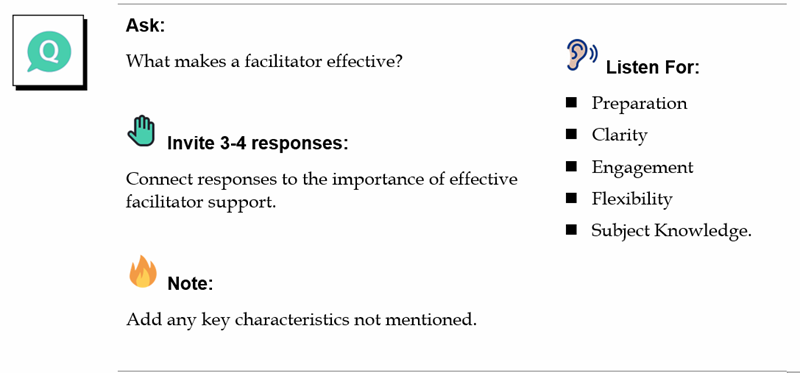
Instead of turning those elements into a paragraph, refine them into instructions the facilitator can scan:

Ask Participants to Identify Effective Facilitator Behaviors

Ask: What makes a facilitator effective?

  • Invite 3–4 responses.
  • Listen for: preparation, clarity, engagement, flexibility, and subject knowledge.
  • Add any key characteristics not mentioned.
  • Connect responses to the importance of effective facilitator support.

Nothing important has been lost.

But now the instructions are easier to see, process, and execute.

That's the difference between information about facilitation and instructions for facilitation.

Content Block - AIM n CLEAR

AIM & CLEAR Work Best Inside a Content Block

The AIM & CLEAR methodology works best when paired with a consistent structure for facilitator instructions.

The approach we use is:

Visual Cue: What am I doing?

An icon or visual cue establishes the general facilitator action.

For example:

  • Say this
  • Show Slide
  • Make Key Point

Headline: How am I doing it?

The headline turns that general action into a specific instructional direction.

AIM: What information do I need?

AIM makes sure the facilitator has the actions, information, and direction needed to successfully execute the block.

CLEAR: Can I use it at a glance?

CLEAR refines that information so the facilitator doesn't have to hunt through paragraphs during delivery.

Together, the pieces answer four questions:

Visual Cue: What am I doing?
Headline: How am I doing it?
AIM: What do I need to successfully do it?
CLEAR: Can I quickly use this while facilitating?

That creates instructions designed around the reality of facilitation rather than simply around the organization of content. 

Not Sure Where Your Facilitator Guide Needs Work?

Before fixing a facilitator guide, you first need to recognize where the problems are.

That's where the ILT Triumvirate Quick Health Check can help.

The Quick Health Check provides a starting point for reviewing your instructional materials and identifying areas that may need attention.

If that review reveals problems with facilitator instructions, AIM & CLEAR provides a practical method for addressing them.

Use the Quick Health Check to identify the problem. Use the AIM & CLEAR methodology to improve it.

The Final Test: Give It to Another Facilitator

There is one final question worth asking:

Could another qualified facilitator successfully deliver this instructional moment without asking me what I meant?

If they need clarification, something may be missing from AIM.

If they have to stop and read a dense paragraph to understand what to do, the instructions probably need another pass through CLEAR.

Great facilitator instructions should reduce interpretation without turning the guide into a script. They create enough structure to support consistent delivery, while leaving enough room for the facilitator to actually facilitate.

From Better Instructions to Better ILT

Writing better facilitator instructions is important, but it's still only one part of building effective instructor-led training.

That's why the AIM & CLEAR method fits within a larger approach.

Assess

Use the ILT Triumvirate Quick Health Check to identify potential weaknesses in your facilitator guide, participant guide, and slide deck.

Improve

Use focused methods such as AIM & CLEAR to address specific issues, including the completeness, clarity, and usability of facilitator instructions.

Align

Use the ILT Triumvirate to make sure the Facilitator Guide, Participant Guide, and Slide Deck work together as one instructional system.

Reassess

Return to the Quick Health Check after making improvements. Look at the three resources again to determine whether the changes addressed the original issue and whether additional opportunities for improvement have emerged.

Better instructor-led training doesn't come from creating better documents in isolation. It comes from making sure each resource does its job and all three resources work together.


Do Your ILT Materials Work Together? Take the Quick Health Check

Do Your ILT Materials Work Together? Take the Quick Health Check

Evaluate your facilitator guide, participant guide, and slides with the free ILT Triumvirate Quick Health Check and Action Plan.
Read More
The ILT Triumvirate: 3 Resources Every ILT Program Needs

The ILT Triumvirate: 3 Resources Every ILT Program Needs

Develop effective instructor-led training by aligning facilitator guides, participant guides, and presentation slides into one connected learning...
Read More
Key Components of a Facilitator Guide

Key Components of a Facilitator Guide

Learn the essential components of a facilitator guide to ensure consistent, scalable delivery of instructor-led training.

Read More